AI Codebase Risks 2026: How to Stop the Ticking Time Bomb
AI coding tools like Claude, Copilot and Cursor offer unprecedented speed but often introduce severe security vulnerabilities and technical debt due to system-level ignorance. Following a costly AI-driven outage, this article outlines a three-step DevSecOps framework—secure prompting, ruthlessly gated pipelines, and architectural resilience—to safely scale AI development without catastrophic failures.
AI coding tools like Claude, Copilot and Cursor offer unprecedented speed but often introduce severe security vulnerabilities and technical debt due to system-level ignorance. Following a costly AI-driven outage, this article outlines a three-step DevSecOps framework—secure prompting, ruthlessly gated pipelines, and architectural resilience—to safely scale AI development without catastrophic failures.
AI Codebase Risks 2026: How to Stop the Ticking Time Bomb
I want to take you back to a project some team worked on in 2024. They were under a massive crunch, so they decided to rush some Cursor-generated microservices straight into production. They thought they were being efficient. Two weeks later, a sneaky SQL injection—born from a piece of "optimized" AI query generation—took down their payment gateway for 6 hours. It cost them six figures and, worse, a massive hit to their customers' trust.
That absolute nightmare is what inspired this post. Because here we are in 2026, with agents like Devin, Cursor, Lovable and Claude churning out code like candy, and the reality is stark: we are all one unchecked commit away from our own explosion.
The Hidden Bombs in Your AI Code
AI coding tools are incredible, but the marketing hype hides a darker reality. Yes, they boast 40–80% merge rates on simple boilerplate tasks. But when it comes to complex work? They crater. Performance fixes merge at just 55%, and bug fixes hover around 64%.
The real killer isn't the code that fails immediately; it's the technical debt that silently accumulates. AI tends to hallucinate "statistically probable" fixes that completely ignore your broader architecture, resulting in incoherent patches.
Recent studies analyzing thousands of agent-generated pull requests show a grim picture. The PRs that get rejected usually touch too many files, feature massive, unnecessary changes, and fail CI checks at a rate 15 times higher than human code—mostly due to incomplete or flat-out incorrect logic. We're seeing financial firms openly blaming AI for downtime. Agents fail spectacularly during integration: API contracts break, data shapes don't match, and dependencies go rogue.
Why Agents Fail: The Core Flaws
If we want to fix this, we have to understand why it happens. It usually boils down to four main flaws:
Local optimization, global ignorance: AI is fantastic at writing an isolated function, but it bombs at system coherence. It doesn't understand your technical debt or how a change in one microservice breaks a dependency three layers deep.
Security blind spots: Agents will confidently spit out injection risks, terrible authentication flows, and hardcoded secrets. You have to treat AI-generated identity and state code as high-risk by default.
Misalignment and abandonment: A huge chunk of AI PRs die simply because reviewers don't want to engage with them. Agents often skip project norms, duplicate work, or build features nobody asked for.
Over-permissioned access: Misconfigurations that grant AI agents "super-admin" powers turn a single minor breach into a total system compromise.
Here is a perfect example of how a simple prompt can create a catastrophic vulnerability:
Python
# AI-generated nightmare: A "secure" login built from a vague prompt
user_input = request.GET.get('username') # No input validation whatsoever!
# Classic SQL injection bomb. The AI "optimized" away parameterized queries.
cursor.execute(f"SELECT * FROM users WHERE name = '{user_input}'")
How to Defuse the Bomb
You don't have to stop using AI—you just need to put blast shields around it. Here is the three-step framework my teams use today.
Step 1: Secure Prompting & Human-in-the-Loop
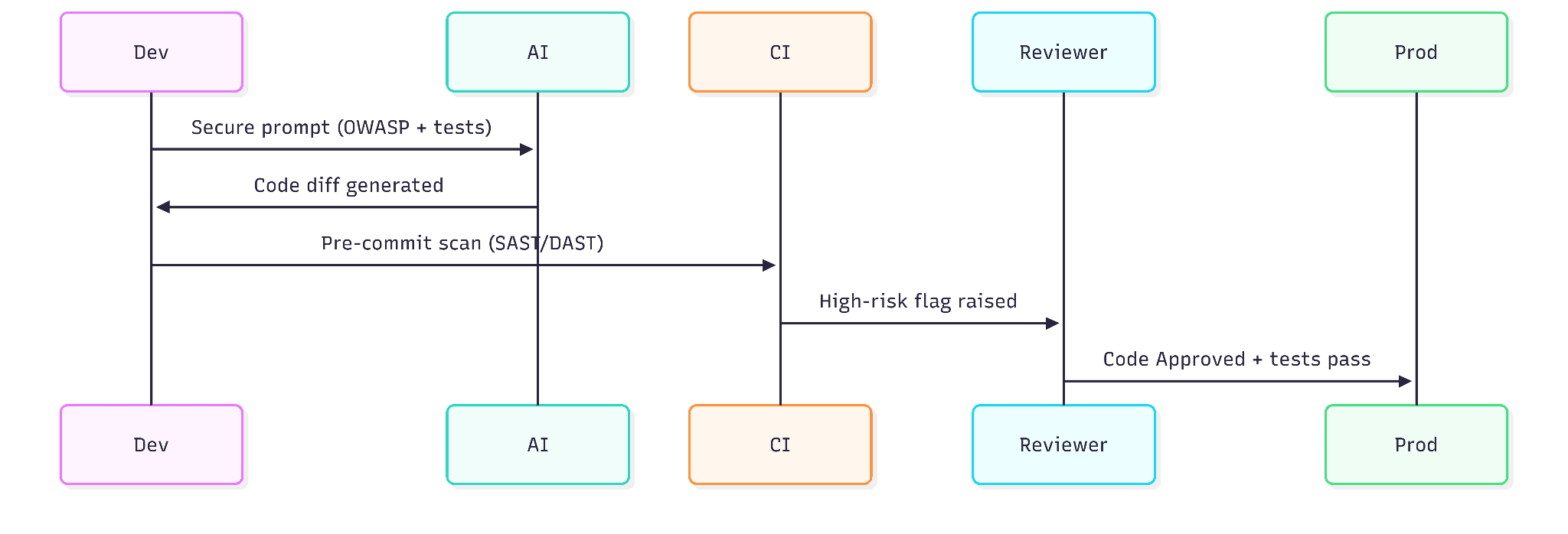
Treat your prompts like fortresses. Don't just ask for a "user login." Specify exactly what you need: "User login using bcrypt hashing, parameterized queries, brute-force protection, following OWASP guidelines." And never feed production data into an LLM; stick to synthetic or redacted examples.
Most importantly, mandate human review gates. No AI code merges without a human looking at the diff, especially for security or performance PRs.
Step 2: Bulletproof Your Pipelines
You need a DevSecOps armor layer specifically designed for AI-generated code.
Sandbox your agents: Keep them in read-only mirrors with network isolation and pinned dependencies.
Automated gates: Enforce SAST/DAST on every single commit. Your CI should aggressively scan for vulnerabilities, exposed secrets, and SBOM anomalies.
Runtime enforcers: Use Git hooks, real-time monitoring, and automatic reverts if the code drifts from expected behavior.
Risk Category | Guard/Prevention Strategy | Tool Examples |
SQLi / Injection | Parameterized queries, SAST | OWASP ZAP, Kiuwan |
Dependency Compromise | Pinning, Allowlists | Dependabot, Sigstore |
CI Failures | Auto-tests, Diff review | GitHub Actions |
Technical Debt | Logic audits, AI peer review | CodeRabbit |
Step 3: Architectural Resilience
Train your agents on your repository's context and norms. Decompose large tasks into smaller ones, force the AI to check existing PRs, and validate everything pre-submit. Build feedback loops where you log the AI's outputs and tweak your prompts when it generates false positives.
Finally, scale with least privilege. Scope permissions tightly and never give an agent super-access. On my teams, we cap AI generation at 20% of PRs when starting a new project—our code quality soared 30% once we implemented that limit.
Ship Fast, Explode Never
Implement these safeguards today: prompt securely, gate ruthlessly, and pipeline smartly. Your AI codebase doesn't have to be a ticking time bomb. If you wire it right, it's a rocket. I've personally seen teams cut their debugging time in half after defusing their AI workflows.
Grab a coffee, go audit your last 10 AI-assisted commits, and let's build unbreakable software.